Local LLM on a Mac in five minutes: oMLX + Gemma 4
Ollama took 126 seconds, whereas oMLX only took 1.8 seconds. How I run a free ChatGPT on my own Mac, and what it does for me all day.
Why not just use ChatGPT?
Five reasons why you should consider local models:
- Every answer is free. A cloud model charges per request, so a job that runs thousands of times a day is a bill that grows with it. On your own machine, that same job costs only electricity.
- Nothing you type leaves your Mac. No account, and no company holding on to it.
- No rate limits and no outages. A job that runs all day is exactly the kind that gets throttled or cut off.
- The model cannot change under you. Cloud models get retired or quietly updated, and a prompt that worked last month stops working. The file on your disk is the same file next year.
- No trip over the internet. A second saved does not sound like much until you run the job ten thousand times.
Frontier models still win the hard jobs: real reasoning, super long documents, and code you are going to ship. This is for the simple, repetitive work, and there is a lot more of that than people think.
One catch. It is free to run, not free to start. You need a well performing Mac with enough memory and high memory bandwidth enough to hold the model.
Why oMLX?
I started off using Ollama, but it was really slow compared to oMLX. Claude Code timed the same job on both: 1.8 seconds on oMLX versus 126 seconds on Ollama for the same work. That is the same Mac, the same model class, and a 70-fold gap.
What a local LLM actually is
A local LLM is a ChatGPT-style model that runs on your own machine: no account, no API bill, and nothing you type leaves your Mac. oMLX, for someone who has never heard of it, is pretty much the same as Ollama, but super specialised on Apple Silicon to maximise the tokens per second throughput. I run it on a MacBook Pro with an M4 Max chip and 128 GB of memory. The cost to run it, once you already have a Mac, is just the price for the electricity, so it’s virtually free.
Day to day, I have a tweets processing pipeline running on it, and what it pulls out of each tweet is the sentiment. For my newsletter, I run every subscriber’s email address through my local LLM to find out what the actual first name is, because I tried to do that rule-based before, and then a “Hi Wurst,” came out, which was wrong: wurst.hans@ is surname-first, and his name is Hans. Another thing I use it for is to update my CLAUDE.md files whenever I push new code, because those files carry an overview of my folder structure, classes and functions, which the push might change. And my CRM has an automated process in the background: whenever a contact is due, it suggests a follow-up message using my local LLM.
You don’t really need frontier models for many of the simple tasks. Whatever text-based task you have, you should be able to run it on a local LLM for free.
Getting it running
-
Download the oMLX installer from its website and install it like any Mac app.
-
Download an open-weight model from the MLX community, which lives on Hugging Face. I run
gemma-4-26b-a4b-it-nvfp4, a Gemma 4 build packaged for Apple Silicon. -
Start the server. oMLX sits in the menu bar at the top of your screen, as a small bird icon. Click it and the first line of the menu tells you what you need:
Server: running (port 8001). The number in brackets is your port. Note it down, because the next step needs it.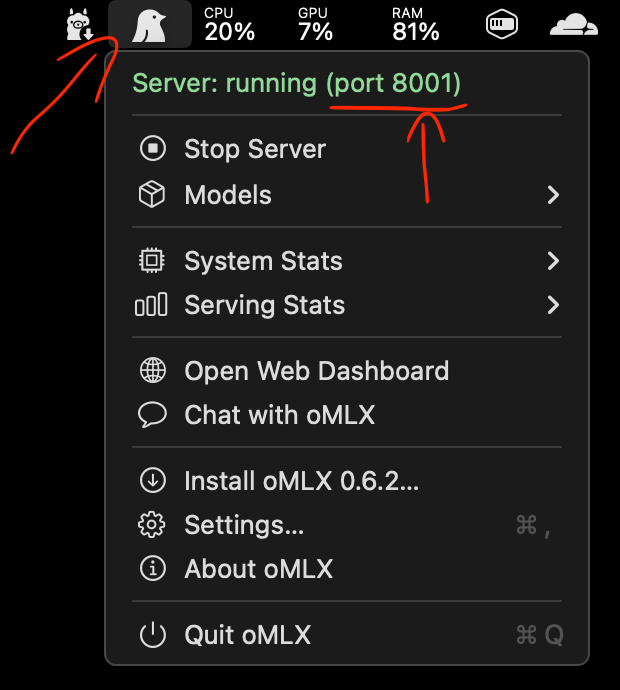
The oMLX menu bar icon, opened. The port is the number in brackets on the first line, 8001 in my case. -
Open
http://localhost:<your_port>/admin/chatin your browser, putting that number where<your_port>is.localhostmeans this Mac and nowhere else. The port is a numbered door on your machine: oMLX listens behind one door, and the number tells the browser which one to knock on. Mine runs on 8001, so I typehttp://localhost:8001/admin/chat. If the page does not load, either the number is wrong or the server is not running. That is oMLX Chat, and it looks like every chat app you have used: a model picker at the top, a message box at the bottom, a New Chat button down the left. Type a question, get an answer, exactly like ChatGPT, except it never leaves your Mac. The panel on the right shows the active model and the tokens per second while it answers, and the line under the message box says it plainly: all conversations run locally on your device.
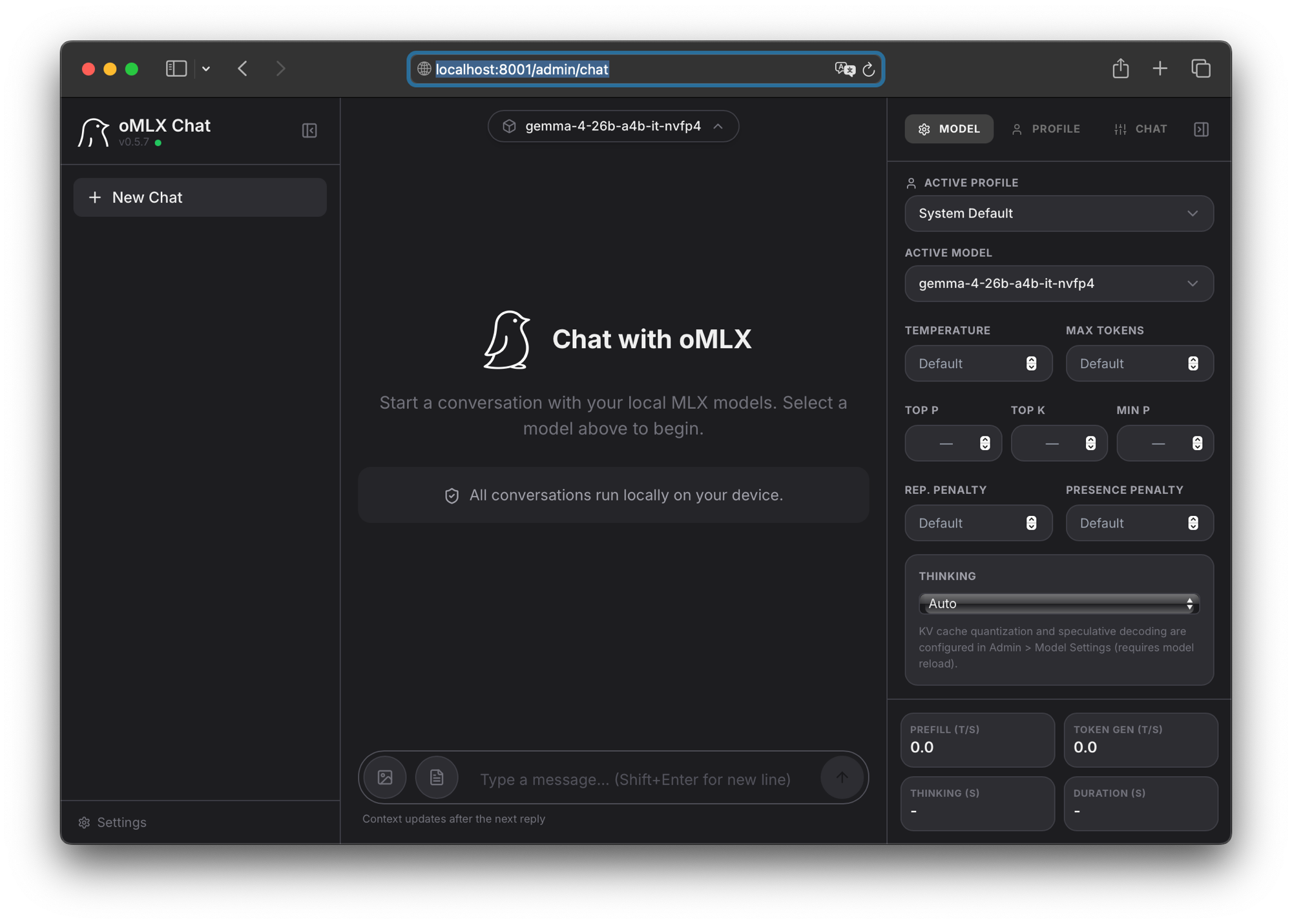
For scripts and tools there is more under the hood: the same server speaks OpenAI’s API on that same port, so any tool that can talk to ChatGPT can be pointed at your Mac instead by swapping one URL.
One thing I learnt the hard way. You really have to manage the context window very closely, otherwise it spins out into a death spiral, where it just repeats the same output over and over until it gets stopped by the system.
What I would tell you
- Pick oMLX over Ollama on Apple Silicon. 1.8 seconds versus 126 for the same work, in my case.
- Manage the context window closely. A spiralling model repeats itself until something kills it.
- You don’t really need frontier models for the simple tasks, like email drafting and processing. Whatever text-based task you have, you should be able to run it on a local LLM for free.
What the model name means
gemma-4-26b-a4b-it-nvfp4 looks like a licence plate. It is five facts, in order.
gemma-4is the family and the generation. Google’s open-weight models, fourth version.26bis the total parameters: 26 billion. Roughly, how much the model knows.a4bis the active parameters: 4 billion. All 26 billion sit on disk, but only about 4 billion do the work on any given word. That is what a mixture-of-experts model is, and it is why something this size runs on a laptop at all.itis instruction-tuned. It has been trained to follow instructions and hold a conversation. The version withoutitonly continues text, and would be useless in a chat box.nvfp4is the quantisation: each weight is stored in about four bits instead of sixteen. The model takes roughly a quarter of the memory and moves through it faster, and you pay a little accuracy for it. The name comes from NVIDIA’s 4-bit format, though on a Mac you get the compact storage and not the hardware acceleration it was built for.
Once you can read the name, you can shop for models. Bigger total, more knowledge. Smaller active, faster answers. it for chat. Four-bit if it has to fit.
What hardware you need
Two numbers decide it, and both are about memory. Whether the model fits, and whether the memory is fast enough to keep it fed. Every figure below is Gemma 4, in the three quantisations to give a sense of what type of hardware is needed. If you go down that rabbit hole you’ll probably understand why I’m biased towards Apple Silicon.
Does it fit? The model has to sit in memory while it answers. This is the number to check against the RAM in the machine you already own.
| Model | BF16 | 8-bit | Q4_0 |
|---|---|---|---|
| E2B | 11.4 GB | 5.7 GB | 2.9 GB |
| E4B | 17.9 GB | 8.9 GB | 4.5 GB |
| 12B | 26.7 GB | 13.4 GB | 6.7 GB |
| 26B A4B | 57.7 GB | 28.8 GB | 14.4 GB |
| 31B | 69.9 GB | 34.9 GB | 17.5 GB |
Is it fast enough? For every single word it writes, the machine has to read the active weights out of memory. So the speed you get is set by memory bandwidth, not by the processor. Below is what you need to hold roughly 20 tokens/s, which is about reading speed.
| Model | BF16 | 8-bit | Q4_0 |
|---|---|---|---|
| E2B | ~190 GB/s | ~95 GB/s | ~48 GB/s |
| E4B | ~300 GB/s | ~150 GB/s | ~75 GB/s |
| 12B | ~445 GB/s | ~225 GB/s | ~110 GB/s |
| 26B A4B | ~190 GB/s | ~95 GB/s | ~48 GB/s |
| 31B | ~1165 GB/s | ~580 GB/s | ~290 GB/s |
Assumptions: 20 tokens/s, every weight read once per token for the dense rows, and only the active plus shared weights for 26B A4B. The memory column adds about 20% over the weights for the KV cache. Treat the bandwidth column as a floor, since no machine reaches its peak.
Three things fall straight out of the two tables.
- Four-bit is the whole trick. Going from BF16 to Q4_0 quarters both numbers. That is the difference between a model that needs a workstation and one that runs on a laptop you already have.
- Look at the 26B A4B row twice. It needs 57.7 GB to fit, more than the 31B needs at 8-bit, and yet it wants the same bandwidth as the smallest model on the list. That is the mixture-of-experts trade: all of it has to be in memory, only a slice of it gets read per word.
- Bandwidth is a chip specification, not something you can buy more of. Check the figure for your own chip on Apple’s spec page and read the table against it. If the model fits but the bandwidth is short, it will run, just slowly.
Next time: 26 billion parameters, 4 billion doing the work. Why that trade-off exists, and when you want the opposite.
Get the next episode first
Every week: the progress unfiltered, plus what I can't post publicly. The build, the number, green or red.